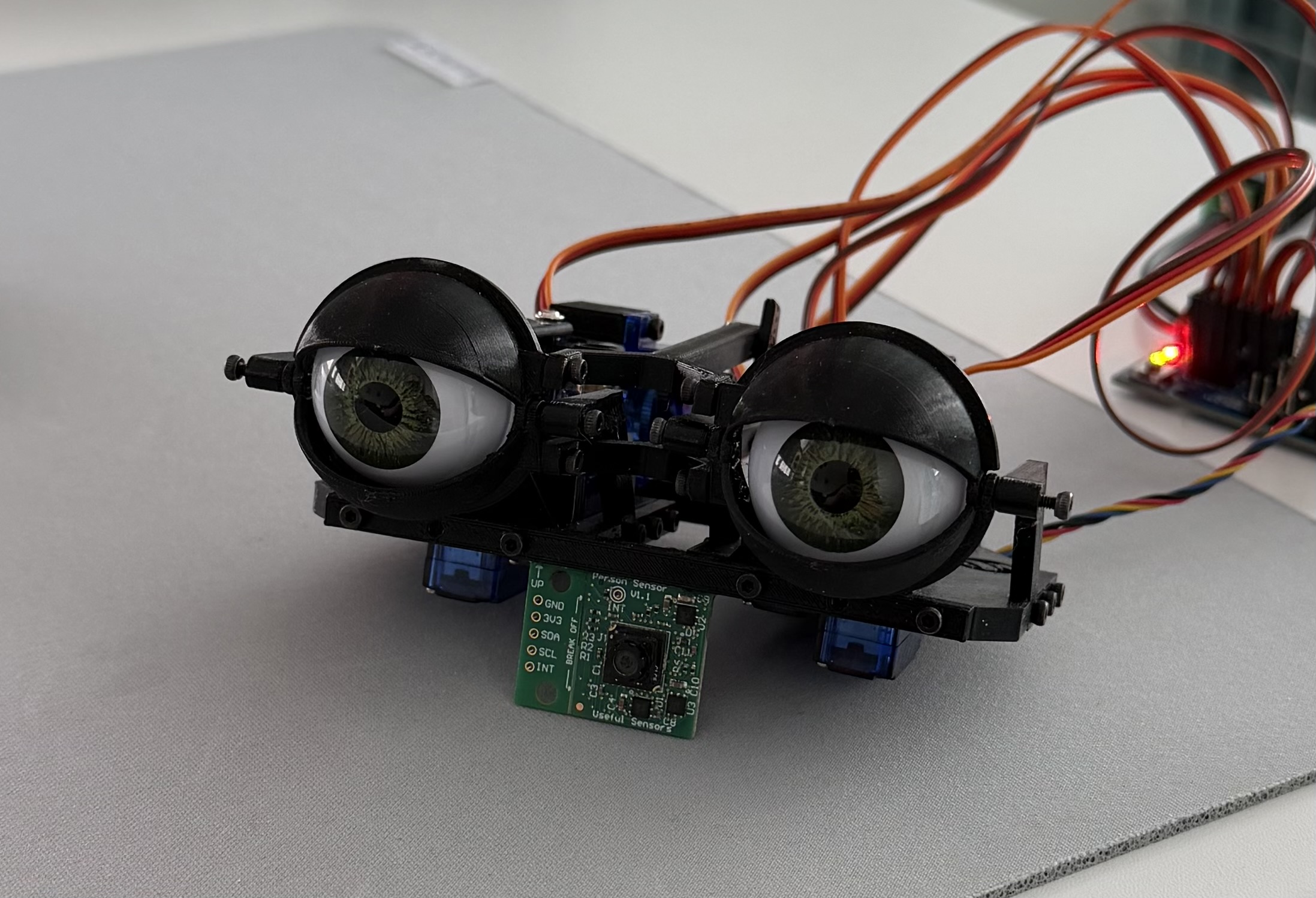
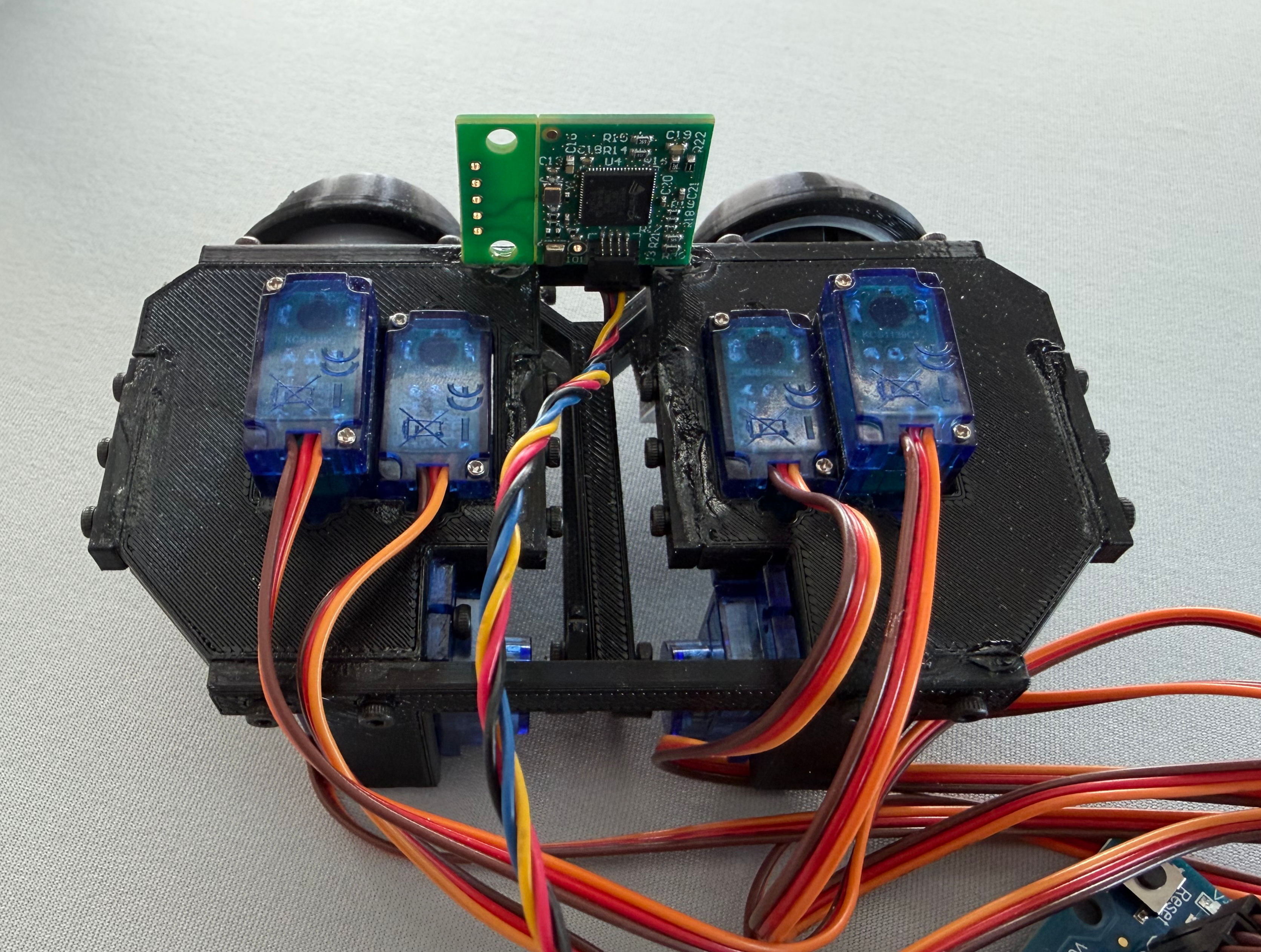
I wanted to make a slightly different version of Will Cogley’s Robot Head, using its already quite compact 3D printed design as the mechanical inspiration but taking the project more towards extra “smartness” feeling to the robot. The first part I wanted to get working was the eyes, because if a printed head cannot look at anything the rest of the interaction does not feel particularly convincing. The mechanism has two small servos for each eye, one for left and right and one for up and down, then two more servos move the shared upper and lower eyelids. It is not a very complicated face yet, but the eyes are one of the most important part, since that’s half of the moving parts. Also they give most of the lifelike feeling, for example looking while you move around or do any development on it, makes the printed shell feel much less like a stationary object.
The part I was most interested in was what happens when a desktop animatronic is not limited to waiting for a controller input or repeating the same animation loop, but can listen, answer, find a face and take a fresh picture when it needs to understand something in the room.
The head should not need someone pressing a button before it does anything or wait for a keyword. While idle it can still track someone who enters its view, and after the room has been quiet for a while it can occasionally look at its surroundings and comment about something it can actually see. Speech takes priority over that idle behavior, so the camera, audio and eye systems become one interaction instead of a collection of separate demos.
Most of this writeup therefore goes towards the code rather than the printed parts. The eyes are only the first physical stage, and in the future I want to add a neck so a face which remains near the edge of the camera can first pull the eyes towards it and then turn the whole head in the same direction.
Splitting the work between two computers
The Arduino UNO R4 WiFi is responsible for the part which needs to remain predictable, it receives a gaze coordinate and turns that into six safe PWM outputs for the servos. The Raspberry Pi 5 does the more expensive work, it owns the webcam, detects faces locally, reads the microphone, plays the voice and handles the network connections used for speech and occasional image analysis.
This separation also means that a slow camera frame or a reconnecting network connection cannot leave the servo loop half finished. The Arduino keeps updating at its own rate, and if coordinates stop arriving it returns the eyes to the calibrated forward position.
The complete hardware path looks like this:
                            USB webcam
                                  |
                                  v
 microphone --------------> Raspberry Pi 5 --------------> speaker
                                  |
                         USB-C / serial 115200
                                  |
                                  v
                         Arduino UNO R4 WiFi
                           |      |       |
                         SDA     SCL   5V + GND logic
                           |      |       |
                           v      v       v
                    PCA9685 servo shield at 0x40
                                  |
                         PWM channels 0 through 5
                                  |
                +-----------------+-----------------+
                |                                   |
       four eye direction servos          two shared eyelid servos

 regulated 6 V / 8 A supply ------> shield servo V+ and GND
                                       |
                         common ground with the Arduino

 Person Sensor at 0x62 -- Qwiic / Wire1 -- Arduino
          physically connected, but not polled by the firmware
The shield logic connection and the servo power connection are two different
things. The shield VCC is connected to the Arduino 5V pin so the PCA9685 can
communicate over SDA and SCL, while the actual servo rail is powered by the
separate regulated 6 V supply. The servo current should not pass through the
Raspberry Pi or the Arduino 5 V pin, and the external supply ground, shield
ground and Arduino ground have to be common.
There is also a Qwiic Person Sensor mounted below the eyes because it was part
of the physical assembly, but the webcam is the active face tracker. It can
remain connected on the UNO R4 WiFi Wire1 bus and light its own indicator,
while the firmware leaves that bus alone and ignores its detections.
Finding the forward position first
Before tracking a face I needed one known position which was mechanically safe, because “roughly centered” is not quite enough when two printed linkages are mirrored and every servo horn was installed by hand. I moved one channel at a time, recorded the pulse which made each eye point forward and kept a separate minimum and maximum around every channel.
These are the values from the actual eye mechanism:
namespace Config {
constexpr uint8_t CHANNEL_COUNT = 6;
constexpr uint8_t ROBOT_LEFT_EYE_X = 0;
constexpr uint8_t ROBOT_LEFT_EYE_Y = 1;
constexpr uint8_t ROBOT_RIGHT_EYE_X = 2;
constexpr uint8_t ROBOT_RIGHT_EYE_Y = 3;
constexpr uint8_t UPPER_LIDS = 4;
constexpr uint8_t LOWER_LIDS = 5;

constexpr int16_t MIN_PULSE[CHANNEL_COUNT] = {220, 250, 280, 220, 220, 280};
constexpr int16_t MAX_PULSE[CHANNEL_COUNT] = {440, 500, 500, 410, 410, 500};
constexpr int16_t CENTER_OPEN[CHANNEL_COUNT] = {330, 286, 350, 376, 360, 394};
}  // namespace Config
The channel names use the robot’s point of view, so the robot’s left eye is the eye on the right when I am standing in front of it. The eyelids are held in their calibrated open position for now, because their fully closed endpoints need the same physical calibration before blinking can be enabled safely.
The camera sends an X and Y value between -1.0 and 1.0, then the Arduino
maps that small common coordinate into the pulse direction needed by each
linkage. Every result still passes through the channel specific clamp:
void setGaze(float normalizedX, float normalizedY) {
  normalizedX = constrain(normalizedX, -1.0f, 1.0f);
  normalizedY = constrain(normalizedY, -1.0f, 1.0f);

  constexpr float X_TRAVEL = 85.0f;
  constexpr float Y_TRAVEL = 85.0f;
  targetPulse[Config::ROBOT_LEFT_EYE_X] = clampPulse(
      Config::ROBOT_LEFT_EYE_X,
      static_cast<int16_t>(
          Config::CENTER_OPEN[Config::ROBOT_LEFT_EYE_X] - normalizedX * X_TRAVEL));
  targetPulse[Config::ROBOT_RIGHT_EYE_X] = clampPulse(
      Config::ROBOT_RIGHT_EYE_X,
      static_cast<int16_t>(
          Config::CENTER_OPEN[Config::ROBOT_RIGHT_EYE_X] - normalizedX * X_TRAVEL));
  targetPulse[Config::ROBOT_LEFT_EYE_Y] = clampPulse(
      Config::ROBOT_LEFT_EYE_Y,
      static_cast<int16_t>(
          Config::CENTER_OPEN[Config::ROBOT_LEFT_EYE_Y] + normalizedY * Y_TRAVEL));
  targetPulse[Config::ROBOT_RIGHT_EYE_Y] = clampPulse(
      Config::ROBOT_RIGHT_EYE_Y,
      static_cast<int16_t>(
          Config::CENTER_OPEN[Config::ROBOT_RIGHT_EYE_Y] - normalizedY * Y_TRAVEL));

  targetPulse[Config::UPPER_LIDS] = Config::CENTER_OPEN[Config::UPPER_LIDS];
  targetPulse[Config::LOWER_LIDS] = Config::CENTER_OPEN[Config::LOWER_LIDS];
}
I did not want a large target change to become one uncontrolled jump, but I also did not want the eyes slowly stepping behind a person who moved across the camera. The output loop runs every 20 ms and can move each channel by at most 12 PCA9685 counts in one update, which gives the servos frequent intermediate positions without making a fast movement feel artificially slow.
float difference = targetPulse[channel] - currentPulse[channel];
if (difference > MAX_SERVO_STEP) {
  difference = MAX_SERVO_STEP;
} else if (difference < -MAX_SERVO_STEP) {
  difference = -MAX_SERVO_STEP;
}
currentPulse[channel] += difference;

int16_t output = clampPulse(
    channel, static_cast<int16_t>(currentPulse[channel] + 0.5f));
pwm.setPWM(channel, 0, output);
Turning a webcam frame into a gaze coordinate
The webcam sits behind the eyes so its view is close to the direction the head
is facing. Face tracking is done locally on the Raspberry Pi with OpenCV’s
YuNet detector, so normal tracking frames do not need to be uploaded anywhere.
The detector returns a face box and confidence, then the center of the box is
converted into the same -1.0 to 1.0 coordinate used by the Arduino.
left, top, face_width, face_height = (float(value) for value in face[:4])
confidence = float(face[14])
center_x = left + face_width * 0.5
center_y = top + face_height * 0.5

normalized_x = center_x / detect_width * 2.0 - 1.0
normalized_y = 1.0 - center_y / detect_height * 2.0

targets.append(FaceTarget(
    x=max(-1.0, min(1.0, normalized_x)),
    y=max(-1.0, min(1.0, normalized_y)),
    area=max(0.0, face_width * face_height / frame_area),
    confidence=confidence,
))
When there is more than one face the target score uses detection confidence, face size and distance from the face which was already being followed. That last part is important because choosing only the largest face can make the eyes jump between two people whenever their boxes change by a few pixels.
Detection coordinates also move slightly even while a person is standing still, so the target is filtered before it reaches the serial connection. Small changes stay inside a deadband, normal movement is smoothed and a large change raises the filter response so the eyes can catch up quickly:
def filter_axis(old_value: float, target_value: float) -> float:
    difference = target_value - old_value
    distance = abs(difference)
    if distance < self.DEADBAND:
        return old_value

    response_range = self.FAST_RESPONSE_THRESHOLD - self.DEADBAND
    response = min(1.0, (distance - self.DEADBAND) / response_range)
    alpha = self.FILTER_ALPHA + (
        self.FAST_FILTER_ALPHA - self.FILTER_ALPHA
    ) * response
    return old_value + difference * alpha
Only the newest gaze matters. The Python side replaces the pending sample instead of building a queue of old face positions, then sends at most one gaze command every 40 ms:
async def gaze(self, normalized_x: float, normalized_y: float) -> None:
    x = round(max(-1.0, min(1.0, normalized_x)) * 1000.0)
    y = round(max(-1.0, min(1.0, normalized_y)) * 1000.0)
    self.latest_gaze = (x, y)

# In the serial task:
await asyncio.to_thread(
    self._write_line,
    self.connection,
    f"GAZE {gaze[0]} {gaze[1]}",
)
The final tracking path is fairly small when written as a flow:
latest webcam frame
        |
        v
local YuNet face boxes
        |
        v
stable target selection
        |
        v
deadband + adaptive filter
        |
        v
GAZE -1000..1000 over USB serial
        |
        v
Arduino pulse mapping + hard clamps
        |
        v
PCA9685 at 60 Hz -> six servos
There is also a local browser preview which draws the candidate boxes, selected face and filtered gaze point over the camera image. It is only a testing view served on the Raspberry Pi and the preview frames stay in memory, but it makes it much easier to tell whether a strange eye movement came from face detection or from the calibrated servo direction.
Adding the voice and the idle personality
The camera tracker, serial connection, microphone, audio output and idle observer all run as separate asynchronous tasks on the Raspberry Pi. Losing the Arduino does not stop the voice, losing the camera does not terminate the audio connection and each hardware connection can retry without restarting the rest of the head.
tasks.append(asyncio.create_task(camera.run(stop), name="camera-producer"))
tasks.append(asyncio.create_task(eyes.run(stop), name="eye-controller"))
tasks.append(asyncio.create_task(tracker.run(stop), name="webcam-face-tracker"))
tasks.append(asyncio.create_task(voice.run(stop), name="realtime-voice"))
tasks.append(asyncio.create_task(observer.run(stop), name="idle-observer"))
Speech uses a Realtime session with gpt-realtime-2.1, live transcripts use
gpt-realtime-whisper and the output voice is marin. The microphone audio is
24 kHz mono PCM and semantic VAD decides when a turn starts. While the robot is
playing its own voice the microphone is muted by default, which is a simple
half duplex arrangement but avoids having the head immediately answer itself.
The webcam is opened once and shared with both the local face tracker and the
vision tools. Asking what the head can see captures a fresh in-memory JPEG and
sends that one image to gpt-5.6-luna through the Responses API, while the
continuous face tracking remains local. Visual answers are told to separate a
tentative identification from something which is actually clear in the image,
especially for artwork, people and objects which only partly fit in the frame.
When the room has been quiet for a random two to five minutes the idle observer
can take one low detail frame and request a structured result containing
should_speak, a short comment and a confidence value. A low confidence or
uninteresting result is discarded, spoken comments have at least a five minute
cooldown and any user speech which starts during the observation invalidates
it before it can talk. The JPEG reference is then released and images are only
written to disk when an explicit debug directory has been configured.
if self.activity.busy:
    return False

epoch = self.activity.epoch
jpeg = await self.camera.capture_jpeg()
if self.activity.busy or self.activity.epoch != epoch:
    return False

observation = await self.vision.observe(jpeg, list(self.recent_comments))
if not observation.should_speak or observation.confidence == "low":
    return False
The personality prompt is deliberately small. The head is warm, curious and a little wry, but it is also told that it is artificial, that it should not invent human memories and that a camera image is not permission to guess sensitive things about a person. Most replies are one to three short sentences, because a physical object speaking in the room becomes tiring much faster than a chat window filling with text.
                           quiet room
                               |
                        wait 2-5 minutes
                               |
                               v
                    capture one memory-only JPEG
                               |
                               v
                structured low-detail room observation
                      |                        |
            not useful / uncertain       worth saying
                      |                        |
                   discard          short spoken comment
                                               |
                                      five minute cooldown

 user speech at any point --------> cancel the idle observation
What the first part of the head can do
At startup the eyelids are open and both eyes return to the calibrated forward position. When the webcam finds a face the eyes follow its filtered position, and when the face disappears or the serial stream stops the Arduino centers them again instead of keeping the last sideways pose. During speech the same tracker keeps trying to find the person being addressed, while the Raspberry Pi can continue listening, speaking and occasionally looking at the room.
There is still a lot of head left to make, blinking needs its final mechanical endpoints and the printed shell can eventually gain more expression than just its gaze, but the next larger movement will be the neck. The same filtered face target can become two related controls, a fast eye movement which is already working and a slower head movement which follows only when the target remains far enough from the center.
filtered face target
        |
        +------> fast eye gaze        working now
        |
        +------> slower neck follow   future
The eyes were still a useful place to begin. They already combine most of the boundaries the rest of the head will need like physical calibration, local perception, safe low level motion and a higher level personality which can fail or reconnect without taking the mechanism down with it.
To Be Continued
Will be continue with the Neck and Head once I aqcuire more parts to continue project.